Get started in three steps
Create your index
Sign up for free, then upload your PDFs, Word files or web pages in the browser. index4.ai turns them into your searchable index — no credit card, nothing to install.
Pick your assistant and ask
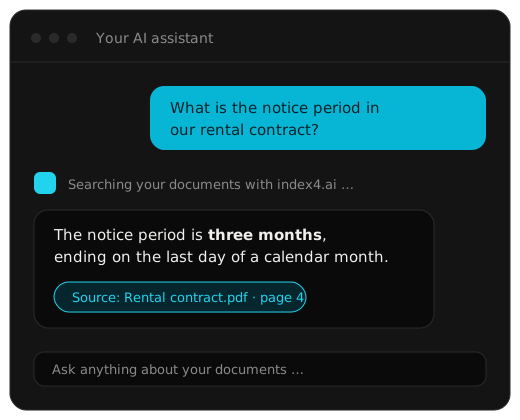
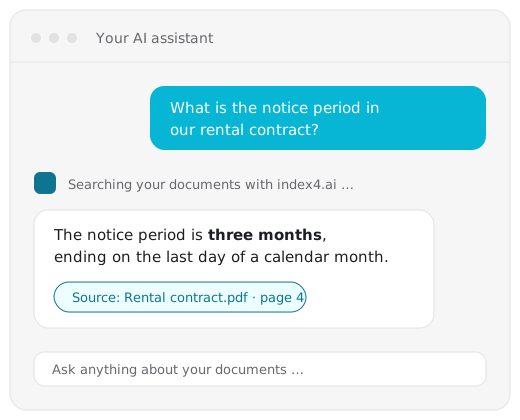
Connect index4.ai to the AI you already use. Then just ask — answers come with the passages they are based on.
index4.ai has a connector in Claude's directory — it is still listed under its previous name, POMA Grill. Open the listing, click Connect, and sign in when your browser asks. No key, nothing to install.
Available in theClaude connector directory ↗listed as “POMA Grill”Works with Claude on web, desktop and mobile, and in Claude Code.
Any assistant that lets you add a connector by URL can use index4.ai. Add a custom connector with this address and log in when your browser asks:
https://mcp.index4.aiStep by step: Use index4.ai in your AI assistant.
For Cursor, Claude Code and other MCP clients, add the hosted endpoint to the client's config:
{
  "mcpServers": {
    "index4ai": {
      "type": "http",
      "url": "https://mcp.index4.ai"
    }
  }
}
Tools, API-key login and uploads: MCP server reference.
Build it into your app for developers
REST API, Python SDK and MCP server — ingest, search and manage documents from your own code.
What is index4.ai, technically?
index4.ai is a fully managed RAG API and context backend for AI agents and applications. Upload documents and index4.ai handles parsing, structure-aware chunking, embeddings, vector storage, hybrid search and reranking. Query over REST, Python or MCP and receive prompt-ready context for your own LLM. No vector database, retrieval infrastructure, hosted chatbot or bundled LLM is required.
What does index4.ai actually do?
AI assistants only know what they were trained on and what you paste into the chat. That is why they guess, or tell you they can't see your files.
index4.ai keeps your documents ready. When you ask a question, it finds the passages that answer it and hands them to the AI — together with where they came from. The AI answers from your documents, and you can see exactly which page it used.
Common questions
Do I need to know how to code?
No. You can do everything in the browser, or by connecting your AI assistant. Code is only needed if you want to build index4.ai into your own software.
What does it cost?
There is a free tier to try it out. Paid plans are on the pricing page.
Is index4.ai a RAG as a Service platform?
Yes. index4.ai is a fully managed RAG API and RAG backend — more specifically, a managed context engine. It handles ingestion, structure-aware chunking, embeddings, vector storage, hybrid search and reranking, and returns prompt-ready context over REST, a Python SDK or MCP. More on the managed RAG API.
Do I need a vector database?
No. Embeddings and vector storage are managed by index4.ai; there is no vector database or retrieval stack to run.
Can I use my own LLM? Is there a chatbot?
Yes, bring your own LLM. index4.ai stops at retrieval and hands prompt-ready context to whatever model, agent or assistant you use. No chatbot or bundled model is required.
Where are my documents stored, and who can see them?
Your documents stay in your own project. See Security for the details.
Which files can I upload?
PDFs, Word documents and web pages are the common cases. The ingestion guide has the full picture.
Can I delete my documents again?
Yes, any time — in the console, or with one request if you use the API.
Ready to try it with your own documents?
Create a free account, upload a file, and ask your first question in a few minutes.